Elevators
Elevators are a type of entity that can be used to transport players between different floors or areas in a map.
They are particularly useful in large buildings or complexes where vertical movement is necessary.
Usage
Elevators can be placed by placing an ArmorStand entity with an elevator cabin as a head item.
The cabin can be obtained through the /items command (when BuildTools is present) or:
/minecraft:give @s minecraft:leather_chestplate[custom_model_data={floats:[21]}]
Make sure to surround the elevator cabin with blocks to prevent players from walking out.
The elevator cabin must be placed in the center of 4 blocks, and it must be placed straight (not diagonally).
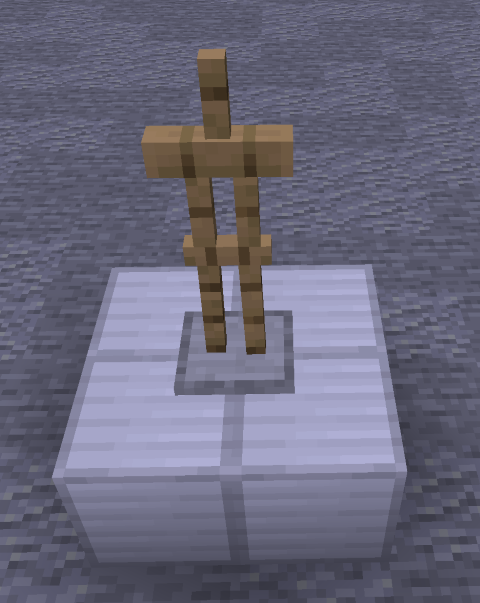
Correct placement of an elevator cabin.
Buttons
Elevator buttons are used to call the elevator cabin to a specific location.
Elevator buttons search the nearest elevator cabin in a 5-block radius.
Make sure the button placed for the elevator is closest to the elevator cabin you are targeting.
Buttons are placed using the following procedure:
- Place an invisible ItemFrame on the wall.
- Place a special "lift" text item inside the ItemFrame.
- Place a physical button on the same block as the ItemFrame (this makes the "lift" item not visible anymore).
The invisible ItemFrame can be obtained through the /items command (when BuildTools is present) or:
/minecraft:give @s item_frame[entity_data={id:"minecraft:item_frame",Invisible:1b}]
The "lift" item can be obtained through the /items command (when BuildTools is present) or:
/minecraft:give @s minecraft:paper[custom_model_data={floats:[15]}]
Restrictions
- Elevators must be placed in the center of 4 blocks.
- Elevators need to be placed straight and cannot be placed diagonally.
- Elevators in the same "shaft" must be placed straight above each other.
- Interaction buttons must be within 5 blocks of the elevator cabin.